Mozilla is strengthening Firefox's fingerprint protections. Mozilla says that its research showed the improvements halved the percentage of users detected as unique.
For those unaware, a digital fingerprint is like a trail of breadcrumbs that websites use to identify you uniquely. This could be anything from your operating system and its settings, your browser's settings, time zone, etc. Mozilla warns that fingerprinting may happen when cookies are blocked, or even in private browsing, and they could continue tracking users for months.
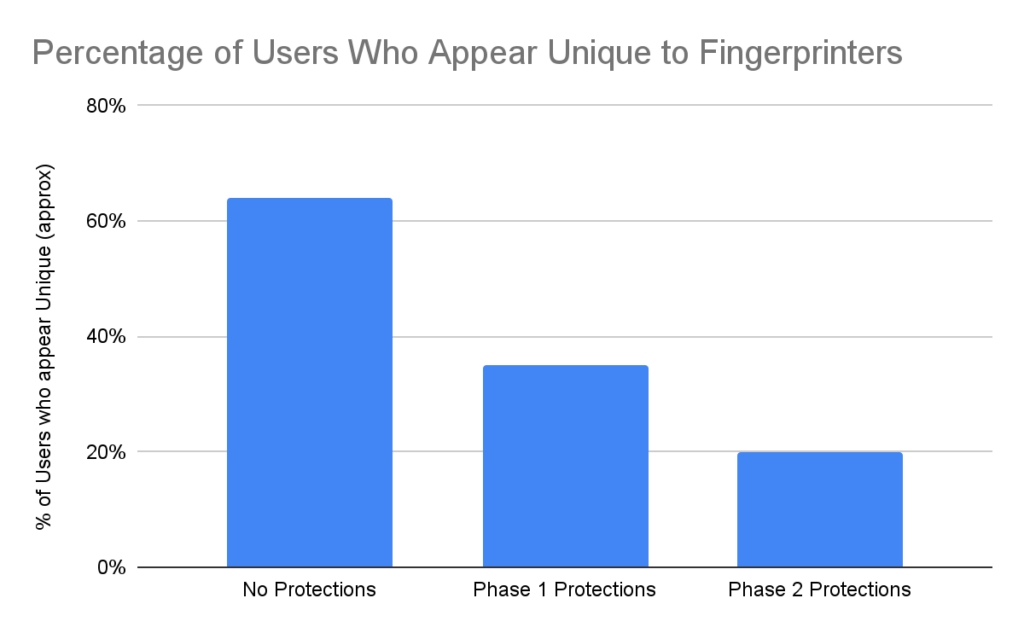
(Image courtesy: Mozilla)
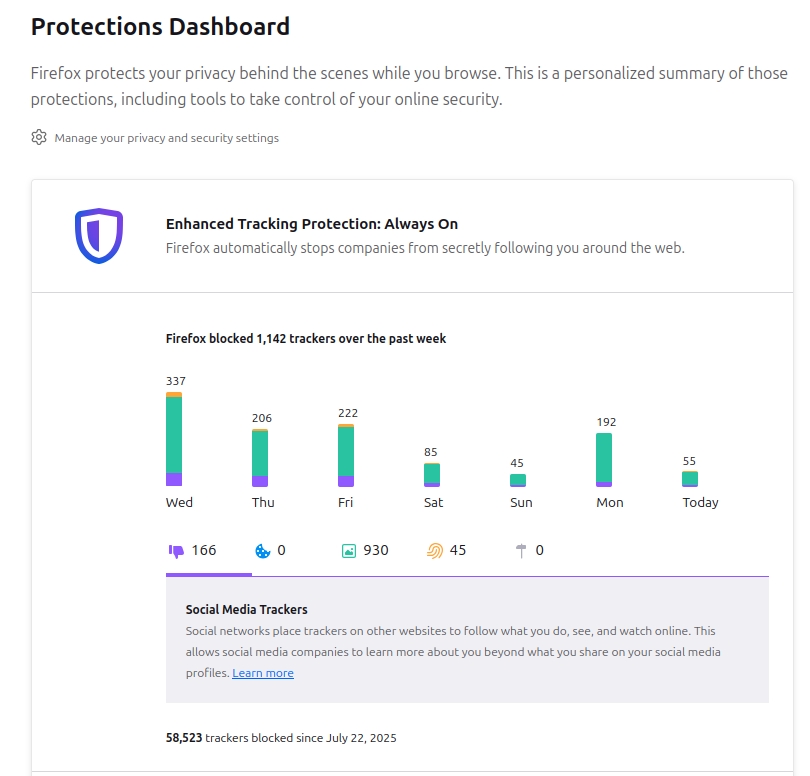
Firefox already has some built-in features such as Enhanced Tracking Protection (introduced in 2020), and Total Cookie Protection (debuted in 2021), which prevent websites/trackers from stalking users around the web for displaying ads, or for nefarious purposes. Here's how many trackers Firefox blocked on my computer in about 4 months.
While Firefox already blocks social media trackers, cross-site tracking cookies, known fingerprinters, cryptominers, etc., Mozilla explains that online trackers often target various information, from the font that is used to render a web page, to scripts that request hardware details such as the number of cores a CPU has, the multitouch capability of a display, and even the dimensions of the dock or taskbar.

Firefox will block such tracking by reporting limited details to ensure that the website and its features don't break. Mozilla's new anti-fingerprint techniques are outlined at this support page.
Images generated in canvas elements will contain random data, when the website tries to read it. If a website just renders data to the canvas element, nothing is modified. In the rare event that a website reads the image data, and displays it to the user again, it will have subtle noise that may affect how the image is displayed.
Firefox will not use locally installed fonts to render text on a web page, especially fonts that are not bundled in operating systems. This will ensure that a user-installed font is not detected by the website, to identify them.
In order to mask the number of simultaneous touches your hardware supports (multitouch support), Firefox will tell websites your device supports either 0, 1, and for all other values, it will report it as 5.
Your screen resolution will be reported, without including your dock or taskbar, as the available resolution. If your CPU has 4 processor cores or fewer, Firefox will tell the website your computer has 4 cores, or 8 cores if your CPU has more than 4 cores.
These hardware-based tracking methods may be used by gaming websites or other pages that request such data. The new techniques will prevent websites from accurately identifying your computer and browser, aka fingerprint them.
Mozilla says that the new fingerprint protections are rolling out with Firefox 145, which releases today (already available at Mozilla's FTP servers). The feature is not enabled by default, likely to prevent websites from breaking, but they are available in Private Browsing Mode, or when Enhanced Tracking Protection has been set to Strict Mode. Users don't need to tinker with more settings to protect their privacy.
Thank you for being a Ghacks reader. The post Firefox gets some new fingerprint protections appeared first on gHacks Technology News.





0 Commentaires