Back in July this year, Google introduced some AI features in the Photos app that allowed users to create videos from photos. Now, it's adding more features, including some that are powered by its image editing AI model, Nano Banana.
Nano Banana was introduced in Gemini 2.5 Flash. To use it in Google Photos, tap the on Edit and then on "Help Me Edit". Select a style that you want to apply to the photo.
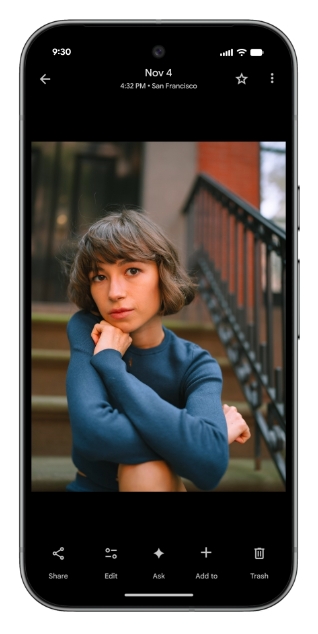
e.g. You could ask it to paint you as a Renaissance portrait, or restyle it with a mosaic made of colorful tiles, or turn the photo into a page from a children’s storybook.

You can use these editing tools to personalize images. Google says it can be used to fix mistakes like forgotten sunglasses, or closed eyes, or a missed smile.

Users can tap the "Help me edit" button, and type things like “Remove Riley's sunglasses, open my eyes, make Engel smile and open her eyes.” And the AI will follow your instructions to edit the photo.

Does anyone else think that's a little creepy?
(Images courtesy: Google)
Moving on, you now use your voice or type prompts to ask the AI to edit images in Google Photos. This feature, which debuted in August 2025 for Android, is now available for iOS users in the U.S.

The iOS app is also gaining the redesigned photo editor which was introduced in May 2025, and lets you edit images using simple gestures, one-tap suggestions and natural language.
Google is introducing a new Create with AI section under the Create tab in the Photos app, that contains AI templates for popular edits, which you can use to quickly generate images without having to type anything. The images are generated by Nano Banana. Create with AI is rolling out to Android users in the U.S. and India. Google is planning to introduce personalized templates, based on your usage. This will roll out in the U.S. in the coming weeks.

Google's Ask Photos tool, which you can use to find specific photos and search your gallery, is now available in over 100 Countries. It supports 17 new languages. Here's a support page that lists all Countries the feature is available in, and the languages that it supports.

There's also an Ask button that you can tap on when viewing an image to ask the AI about the content in it, to find related moments. You can also ask it to edit the image by typing something, or by using one of the suggestions.
Thank you for being a Ghacks reader. The post Google Photos gets more AI features to edit pictures appeared first on gHacks Technology News.





0 Commentaires