Microsoft has released Windows 11 Insider Preview Build 26220.7523 (KB5072043) to the Dev and Beta Channels, based on version 25H2. The update introduces several Copilot-related additions to the taskbar, expands accessibility controls in Narrator, tweaks input and widgets, and delivers a long list of fixes. The same build is available in both channels for now, which also opens a temporary window for Dev Channel users to switch to Beta without reinstalling.
The release follows Microsoft’s current Insider strategy: features are split between those rolling out gradually to systems with the “get the latest updates as they are available” toggle enabled, and changes that apply to everyone in the Dev and Beta Channels. Most of the headline additions in this build fall into the gradual rollout category.
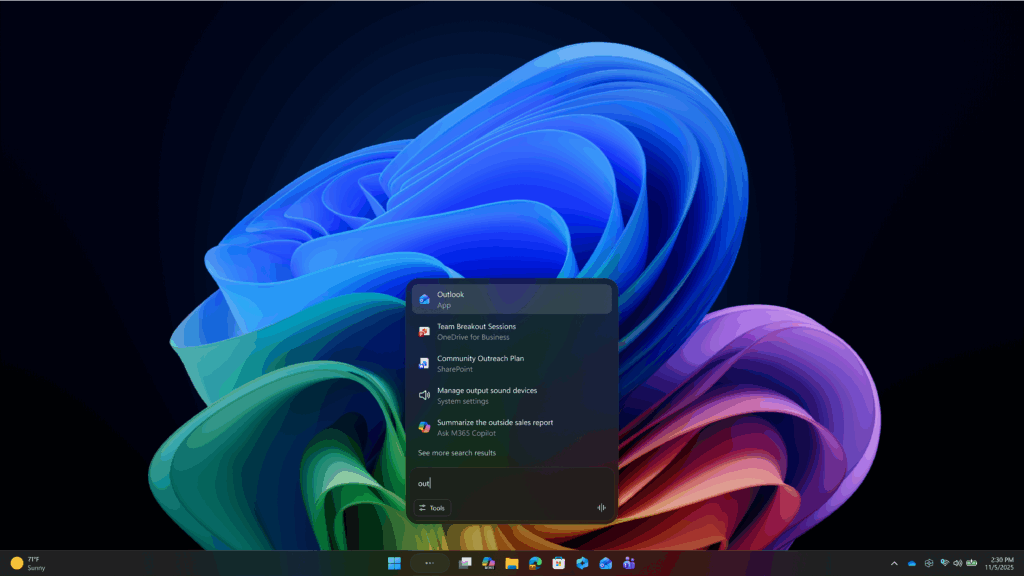
Ask Copilot arrives on the taskbar for commercial users
The most visible change is the rollout of Ask Copilot on the taskbar for commercial customers with Microsoft 365 Copilot licenses. Consumer Insiders saw an earlier version of this feature in October; this build brings a variant tailored for work environments.
Ask Copilot acts as a unified entry point to Microsoft 365 Copilot, Copilot agents, and search. From the taskbar, users can open Copilot with a single click, interact using voice or text, and reference contextual work information tied to their Microsoft 365 environment. Agents can be invoked directly by typing “@” or using the tools button, and search results for apps, files, and settings use the same Windows APIs as standard Windows Search.
The feature is opt-in. It can be enabled under Settings > Personalization > Taskbar > Ask Copilot. Microsoft notes that Ask Copilot does not grant Copilot additional access to personal files beyond what Windows Search already exposes.
The rollout is limited at first to commercial Windows Insider Program customers in the United States and will expand gradually over the coming weeks.
Agents gain taskbar presence and a new launcher framework
Build 26220.7523 also expands how Copilot agents surface in Windows. Agent tasks, such as reports generated by the Researcher agent, can now appear directly on the taskbar. Progress indicators and hover states show real-time updates, and notifications are sent when tasks complete. Microsoft is still experimenting with how these tasks appear, either grouped with the Copilot icon or as separate entries.
Under the hood, Microsoft is introducing Agent Launchers, a new framework that lets Windows apps register AI agents system-wide. Once registered, these agents become discoverable across supported experiences, including Ask Copilot on the taskbar and compatible apps. Agents open their own chat experiences when launched and can maintain context, ask clarifying questions, and take actions.
Microsoft 365 Copilot already uses this framework to expose agents like Analyst and Researcher. Developers can register agents during installation or dynamically at runtime, depending on authentication or subscription state.

Narrator gains granular speech customization
Accessibility sees a notable update in this build. Narrator now allows users to control exactly what properties are spoken when navigating UI elements and in what order. Labels, roles, states, and values can be selected, reordered, or omitted per control type.
Customization is available with Narrator key + Ctrl + P, where users can adjust announcements for buttons, checkboxes, sliders, and other controls. Changes apply across the current app. A preview option lets users hear how an announcement will sound before saving, and a reset option restores default behavior.
On Copilot+ PCs, Narrator customization also supports natural language input. Users can type instructions such as disabling position or selection announcements instead of manually toggling options.
Thank you for being a Ghacks reader. The post Windows 11 Insider build 26220.7523 adds Ask Copilot on the taskbar, Agent launchers, and Narrator controls appeared first on gHacks Technology News.






0 Commentaires